 Super Intelligent Sender
Clean lead lists, before the first send
Bring leads in from CSV, see exactly what was imported and skipped, and fix gaps before they reach a campaign.
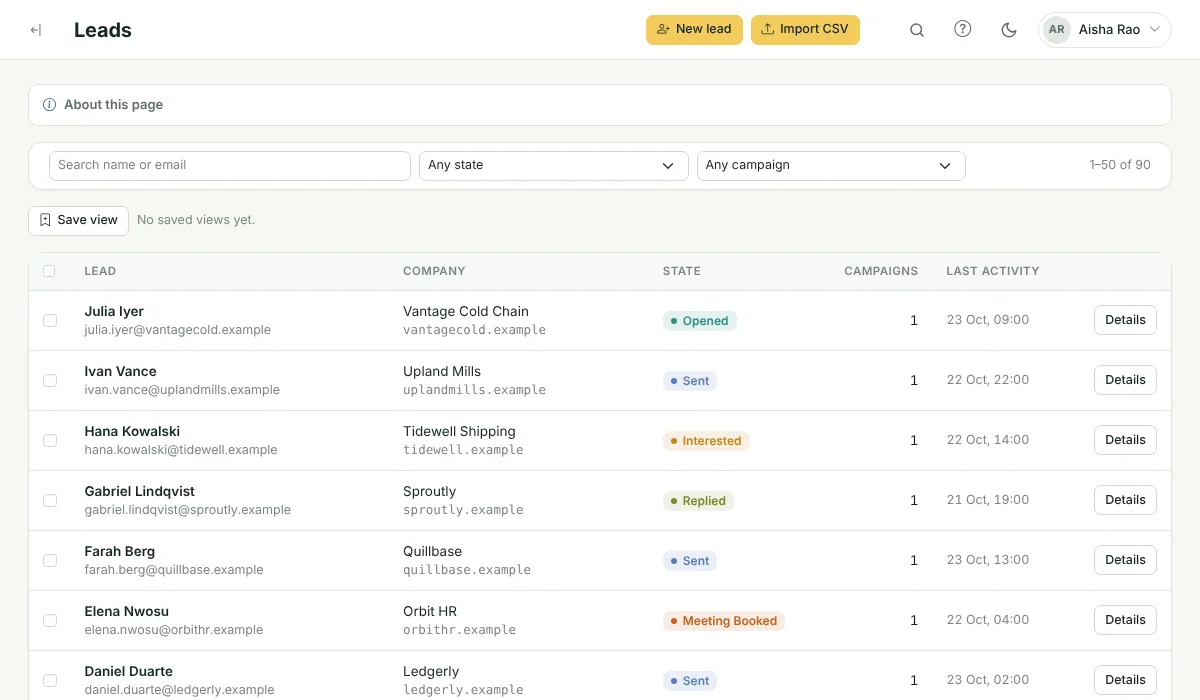
How do I get leads into Super Intelligent Sender?
Upload a CSV file (up to 10 MB). Super Intelligent Sender recognises standard columns such as email, first name, company, phone and LinkedIn URL, keeps any other column as a merge variable, and reports how many leads were imported and why any were skipped, for example because they are on the do-not-contact list or already in the campaign. You can also add leads one at a time or through the REST API.
CSV import
Up to 2,000 rows import straight away; larger files run in the background.
Do-not-contact list
Block single addresses or whole domains. Matching leads are skipped at import and never emailed.
Bulk actions
Select leads (or every lead matching a filter) to add to a campaign, assign for enrichment, suppress or delete.
Saved views
Save the filters you use most and come back to them in one click.
Enrichment queue
Leads missing a phone or LinkedIn URL go to a queue your researchers claim and complete.
Lead details
Open any lead to edit details, add it to a campaign and read its history.
See it in the product

Frequently asked questions
How do I get leads into Super Intelligent Sender?
Upload a CSV file (up to 10 MB). Super Intelligent Sender recognises standard columns such as email, first name, company, phone and LinkedIn URL, keeps any other column as a merge variable, and reports how many leads were imported and why any were skipped, for example because they are on the do-not-contact list or already in the campaign. You can also add leads one at a time or through the REST API.
Does Super Intelligent Sender find email addresses for me?
No. Super Intelligent Sender does not sell or look up contact data. You import your own leads; the enrichment queue helps your team fill in missing phone numbers and LinkedIn URLs.
What happens to duplicates?
A lead already in the campaign is skipped and counted in the import summary, so nobody is enrolled twice.
Problems this solves
Related features
Sending & limits
Connect your Gmail or Google Workspace mailboxes and Super Intelligent Sender decides, for each message, whether now is the right time to send it.
Learn more →AI reply inbox
Replies arrive in one inbox, already labelled. Answer the interested ones without leaving Super Intelligent Sender.
Learn more →Lead pipeline
A pipeline board for the leads your emails warm up, with the full history one click away.
Learn more →See Super Intelligent Sender with your own sending setup
Book a short demo. We will connect a mailbox, check your timing and walk through replies and the pipeline with you.
- 20-minute call
- On your own mailboxes
- Reply within one business day