 Super Intelligent Sender
See every step of every lead, from first email to client
A pipeline board for the leads your emails warm up, with the full history one click away.

What does the Super Intelligent Sender pipeline show?
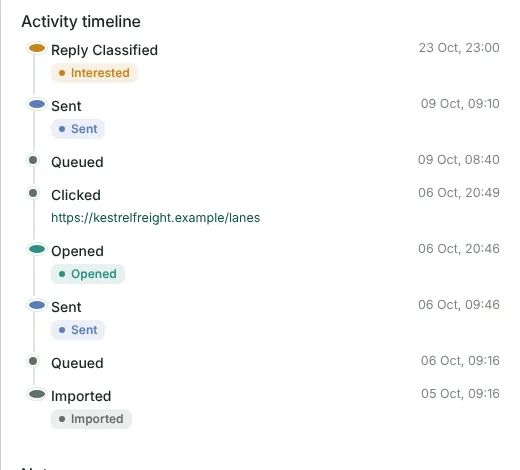
The pipeline board has a column for each stage: Sent, Opened, Replied, Interested, Meeting Booked, Opportunity, Client and Lost. Drag a card to move a lead. Click it to open the lead and see its timeline: every email queued, sent, opened and clicked, every reply and how it was labelled, and every stage change, with notes from your team.
Drag to move
Move a lead between stages by dragging its card. Moving a lead out of the sequence cancels its queued emails.
Full timeline
Queued, sent, opened, clicked, reply classified and every manual stage change, in order, with dates.
Notes
Add notes to a lead so the whole team knows what happened on the call.
Deadline badges
Cards with an open follow-up show the time left; overdue ones turn red.
Filter by campaign
Filter the board by campaign or search for a lead by name.
Stage totals
See totals, leads in progress, won and lost at the top of the board.
See it in the product
Frequently asked questions
What does the Super Intelligent Sender pipeline show?
The pipeline board has a column for each stage: Sent, Opened, Replied, Interested, Meeting Booked, Opportunity, Client and Lost. Drag a card to move a lead. Click it to open the lead and see its timeline: every email queued, sent, opened and clicked, every reply and how it was labelled, and every stage change, with notes from your team.
Can I see which emails a lead opened?
Yes. The lead's timeline lists every email sent, each open and click (with the link that was clicked), and every reply.
Is the pipeline separate from my CRM?
Yes. Super Intelligent Sender keeps its own pipeline for outreach leads. You can read and update leads from other tools through the REST API.
Problems this solves
Replies getting lost
With many mailboxes, nobody sees every reply. One inbox, already sorted, fixes that.
Read more →Follow-ups after a reply
Nothing looks worse than "just bumping this" to someone who said yes yesterday.
Read more →Leads tracked in spreadsheets
Copying replies into rows by hand means the sheet is always a day behind. Let the outreach update the pipeline itself.
Read more →Slow answers to hot leads
The fastest reply usually wins the meeting. Give every interested lead a deadline and make it visible.
Read more →Related features
Sending & limits
Connect your Gmail or Google Workspace mailboxes and Super Intelligent Sender decides, for each message, whether now is the right time to send it.
Learn more →AI reply inbox
Replies arrive in one inbox, already labelled. Answer the interested ones without leaving Super Intelligent Sender.
Learn more →Sequences & A/B tests
Write the opener and follow-ups once. Super Intelligent Sender personalises each one and keeps follow-ups on the same thread.
Learn more →See Super Intelligent Sender with your own sending setup
Book a short demo. We will connect a mailbox, check your timing and walk through replies and the pipeline with you.
- 20-minute call
- On your own mailboxes
- Reply within one business day