 Super Intelligent Sender
Everything between the first email and the signed client
Six core parts and the tools around them, in one workspace. Each one is built around your own Google Workspace mailboxes and the leads you already have.
Sending that checks every email before it goes out
Connect your Gmail or Google Workspace mailboxes and Super Intelligent Sender decides, for each message, whether now is the right time to send it.
- Connect with Google. Add a Gmail or Google Workspace mailbox with Google sign-in. Super Intelligent Sender stores the access token encrypted and never asks for your password.
- Daily and hourly limits. Each mailbox has its own rolling limits. Sends are paced evenly through the hour instead of in bursts, and a new mailbox can ramp up gradually to its target.
- The lead's business hours. Emails go out inside each lead's local working hours and working days, so a lead in Sydney hears from you in the Sydney morning.
- Company lockout and cooldowns. After one person at a company is emailed, the rest of that company waits 24 hours. Frequency caps and cross-campaign cooldowns stop the same lead being hit twice.

Every reply sorted, and answered on the same thread
Replies arrive in one inbox, already labelled. Answer the interested ones without leaving Super Intelligent Sender.
- AI labels. Each reply is labelled Positive, OOO, Negative or Neutral. Gemini is the default; an organisation can use its own Gemini, Anthropic or OpenAI-compatible key.
- Nothing gets lost. If the AI cannot classify a reply, it still lands in the inbox for you to read. Bounces are recognised and the address is suppressed.
- Reply on the same thread. Write your answer in a rich-text editor and send it from the mailbox that received the reply, threaded with the original conversation.
- Signatures. Save signatures per mailbox and insert one with a click.

See every step of every lead, from first email to client
A pipeline board for the leads your emails warm up, with the full history one click away.
- Drag to move. Move a lead between stages by dragging its card. Moving a lead out of the sequence cancels its queued emails.
- Full timeline. Queued, sent, opened, clicked, reply classified and every manual stage change, in order, with dates.
- Notes. Add notes to a lead so the whole team knows what happened on the call.
- Deadline badges. Cards with an open follow-up show the time left; overdue ones turn red.

Sequences that read like a conversation
Write the opener and follow-ups once. Super Intelligent Sender personalises each one and keeps follow-ups on the same thread.
- Multi-step sequences. An opener and as many follow-ups as you need, each with its own wait.
- Merge tags. Use lead fields and any extra CSV column as a variable, with dates and a per-lead AI opener.
- A/B variants. Add variants by hand or let AI write two, then compare open and reply rates per variant.
- Improve with AI. Rewrite a subject or body with your organisation's AI provider.

Clean lead lists, before the first send
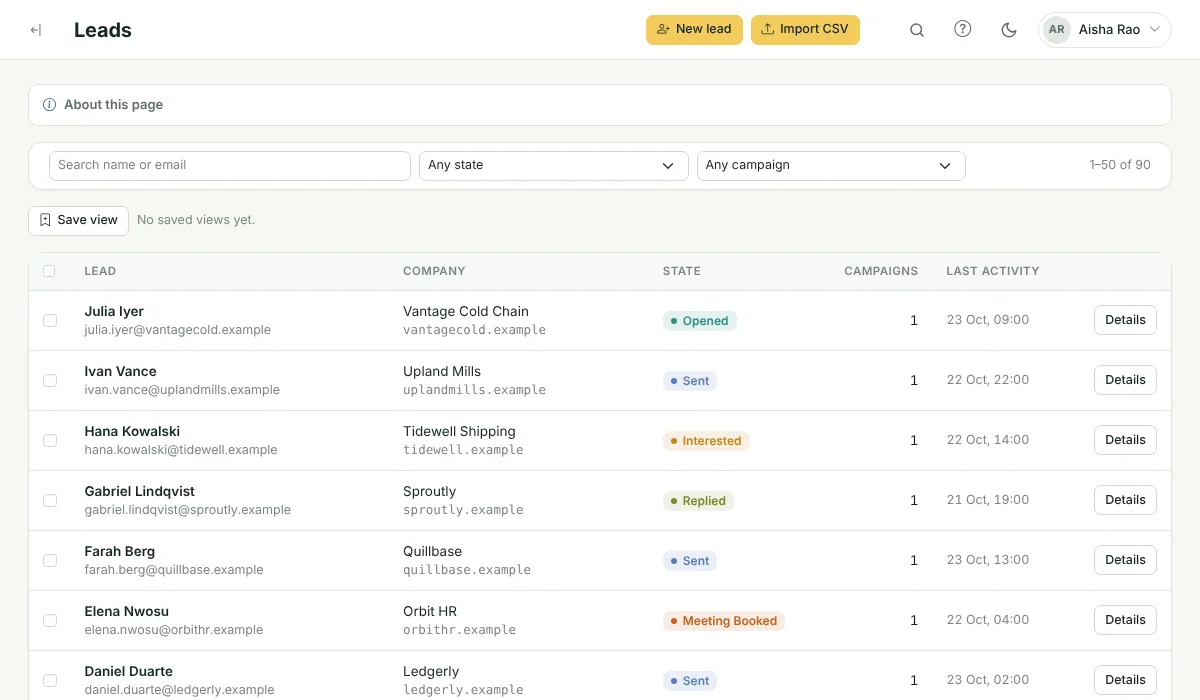
Bring leads in from CSV, see exactly what was imported and skipped, and fix gaps before they reach a campaign.
- CSV import. Up to 2,000 rows import straight away; larger files run in the background.
- Do-not-contact list. Block single addresses or whole domains. Matching leads are skipped at import and never emailed.
- Bulk actions. Select leads (or every lead matching a filter) to add to a campaign, assign for enrichment, suppress or delete.
- Saved views. Save the filters you use most and come back to them in one click.
Every brand and every teammate, in one workspace
Keep each brand's mailboxes and campaigns apart, and give each teammate exactly the access they need.
- Brands. Separate brands or clients, each with its own mailboxes, campaigns, priority and timezone.
- Roles and permissions. Build roles from individual permissions, such as who can launch campaigns or connect mailboxes.
- Two-factor sign-in. Optional authenticator-app codes for every user.
- Activity log. A record of who changed what, and when.

Tools around the core
A/B testing
Add variants to any step. Super Intelligent Sender splits leads evenly between them and shows the results side by side.
Learn more →AI writing
Rewrite a step, draft variants or add a personal opening line for each lead, without leaving the campaign.
Learn more →Send timing
Every lead has a timezone. Super Intelligent Sender waits for their business hours instead of sending in yours.
Learn more →Dashboard & insights
One screen with today's sends, replies and hot leads, and the next moves worth making.
Learn more →Unsubscribes & do-not-contact
Opt-outs, bounces and your own block list are checked before every email, in every campaign.
Learn more →Open & click tracking
Opens and clicks land on the lead's timeline. Links run through your own verified domain.
Learn more →What Super Intelligent Sender does not do
So you know exactly what you are buying.
No guaranteed inbox placement
No tool can promise where an email lands. Super Intelligent Sender controls how and when you send; your domain setup and content still matter.
Email only
Super Intelligent Sender sends email from Gmail and Google Workspace. It does not send LinkedIn messages or SMS for you.
No contact database
Super Intelligent Sender does not sell or look up contact data. You bring your own leads.
No warm-up network
New mailboxes can ramp up gradually, but Super Intelligent Sender does not exchange warm-up emails with other mailboxes.
See Super Intelligent Sender with your own sending setup
Book a short demo. We will connect a mailbox, check your timing and walk through replies and the pipeline with you.
- 20-minute call
- On your own mailboxes
- Reply within one business day