 Engage
Sequences that read like a conversation
Write the opener and follow-ups once. Engage personalises each one and keeps follow-ups on the same thread.

How do campaigns work in Engage?
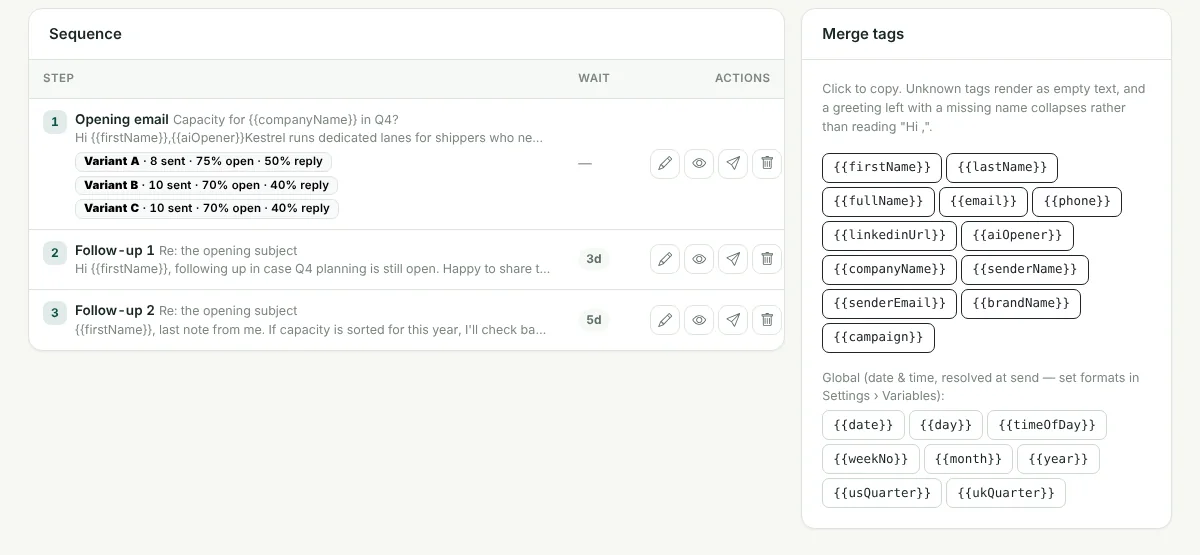
A campaign is a sequence of email steps with a wait between them. Each step has a subject and body with merge tags such as {{firstName}} and {{companyName}}. Follow-ups are sent from the mailbox that sent the opener, on the same thread. You can add A/B variants to a step, write or improve copy with AI, preview each variant with a sample lead, and compare open and reply rates per variant.
Multi-step sequences
An opener and as many follow-ups as you need, each with its own wait.
Merge tags
Use lead fields and any extra CSV column as a variable, with dates and a per-lead AI opener.
A/B variants
Add variants by hand or let AI write two, then compare open and reply rates per variant.
Improve with AI
Rewrite a subject or body with your organisation's AI provider.
Preview and test send
Preview exactly what a lead will receive and send yourself a test.
Schedules
Start and end dates, send days and hours, plus one-time, annual and days-before-a-date schedules.
See it in the product
Frequently asked questions
How do campaigns work in Engage?
A campaign is a sequence of email steps with a wait between them. Each step has a subject and body with merge tags such as {{firstName}} and {{companyName}}. Follow-ups are sent from the mailbox that sent the opener, on the same thread. You can add A/B variants to a step, write or improve copy with AI, preview each variant with a sample lead, and compare open and reply rates per variant.
Does Engage pick the winning variant automatically?
No. Engage shows open and reply rates for each variant side by side; you decide which copy to keep.
Do follow-ups stop when a lead replies?
Yes. A positive or negative reply or a bounce cancels that lead's remaining emails. An out-of-office pauses the sequence until the return date read from the auto-reply, and a neutral reply such as "not right now" pauses it for a set number of days.
Related features
Sending & limits
Connect your Gmail or Google Workspace mailboxes and Engage decides, for each message, whether now is the right time to send it.
Learn more →AI reply inbox
Replies arrive in one inbox, already labelled. Answer the interested ones without leaving Engage.
Learn more →Lead pipeline
A pipeline board for the leads your emails warm up, with the full history one click away.
Learn more →See Engage with your own sending setup
Book a short demo. We will connect a mailbox, check your timing and walk through replies and the pipeline with you.